Learn how to get started with the mobile app.
Who this is for
This tutorial is for anyone who wants to use the mobile app for the first time.
Before you start
This tutorial assumes you have installed the app and opened it for the first time. You can read the How to install the mobile app tutorial for initial information about the app.
What the app can do for you
The mobile app is designed to support competition management and communication.
The main features are:
- View team and fixture information
- View results and rankings
- View and manage your player and team information
- View referee and appointment information
- View club and association information
Sign in first
Use the same email address and password that you use for the website portal or admin portal. The app remembers your login, so you don't need to log in again unless you log out or your account changes.
If you don't have an account, you can create one by clicking "Sign up" on the login screen.
After you sign in
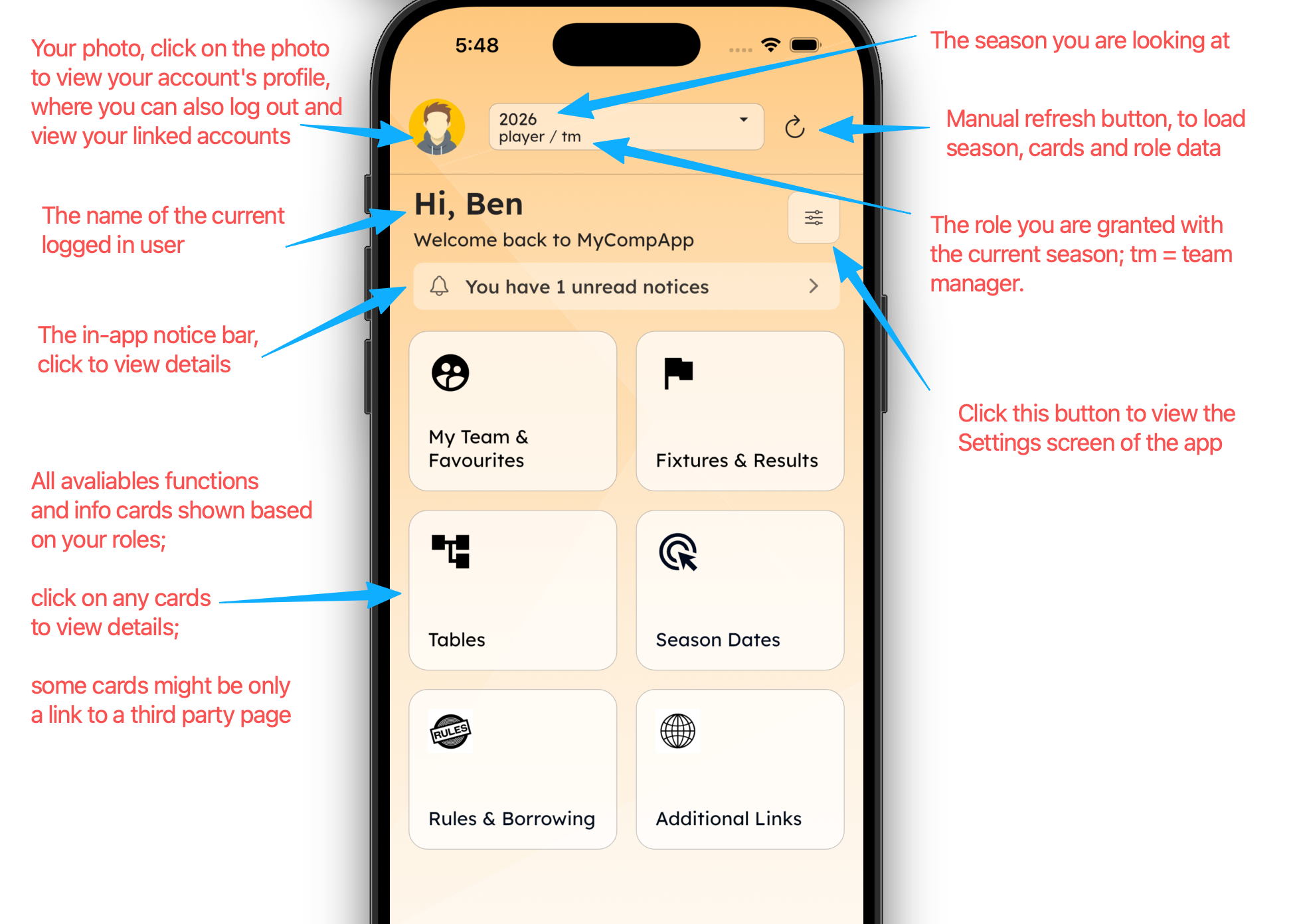
After you sign in, you will see the dashboard screen. The app reads your account roles from the server and shows functions based on those roles. For example, if you are a player, the app will show team and fixture information after your allocation is published. If you are a coach or team manager, the app will show the team and allow you to manage it and publish match sheets. If you are a referee, the app will show referee functions such as availability, appointments, offences, and match day work.
Dashboard screen
The dashboard screen is the main screen of the app. You always start from the dashboard, and it shows functions based on your account roles.
Common problems
-
If you cannot sign in, check that your account has been created and that you are using the correct email address. If you recently changed your password, use the latest password. Please refer to the cannot sign in tutorial for more details.
-
If you see your player, coach, or team manager role at the top but cannot see your team, the team allocation may not be public yet. The association may still be working on team allocations. Please wait until team allocations are published. For more details, see the cannot see teams tutorial.
-
If you can see your team but cannot see any fixtures, the fixtures may not have been published yet.
-
If you can see the fixtures but not the results or scores, even though the results have been entered, the association may have rules that hide results for junior divisions.
-
If you cannot see your team's ranking or table, even though the scores have been entered, the association may have rules that hide rankings or tables for junior divisions.
-
If you are a referee (your registration has been approved) and cannot see your referee roles on the top and the cards for the referee functions, please contact your association for help.